
Download IntelliGeniusAI – AI Content Generation, Free & Secure Tool for Windows, Mac, Android & iOS
Overview of IntelliGeniusAI
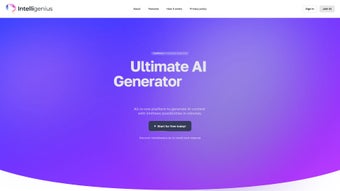
IntelliGeniusAI is a next‑generation artificial‑intelligence platform that brings together text creation, image synthesis, code generation, and conversational chat‑bot capabilities under a single, easy‑to‑use interface. Designed for digital agencies, copywriters, product designers, and developers, the software offers multilingual support, industry‑specific templates, and a powerful Speech‑to‑Text engine that turns spoken ideas into polished content instantly. Whether you need a compelling blog post, a striking visual for a social media campaign, a snippet of clean JavaScript, or a virtual assistant that can answer customer queries 24/7, IntelliGeniusAI delivers high‑quality results in a fraction of the time traditional tools require.
The platform’s cloud‑based architecture ensures that updates are rolled out securely and automatically, so users always work with the latest models without manual patches. With a free tier that includes generous usage limits, the tool is accessible to freelancers and startups, while premium plans unlock higher quotas and advanced customization options. Overall, IntelliGeniusAI positions itself as an all‑in‑one creative engine that streamlines the content pipeline from ideation to publication.
Key Features That Set IntelliGeniusAI Apart
- AI Text Generator: Produces SEO‑friendly articles, ad copy, product descriptions, and more in over 30 languages.
- AI Image Generator: Creates high‑resolution, royalty‑free graphics based on textual prompts, ideal for marketing assets.
- AI Code Generator: Generates clean, commented code snippets for popular languages (Python, JavaScript, Java, C#) and offers debugging suggestions.
- AI Chat Bot Builder: Drag‑and‑drop interface to design conversational agents for websites, support desks, and mobile apps.
- Speech‑to‑Text Conversion: Real‑time transcription with speaker identification, supporting both short notes and long recordings.
- Industry Templates: Ready‑made templates for e‑commerce, education, finance, and health sectors to accelerate content production.
- Custom Prompt Library: Save and reuse prompt structures, enabling teams to maintain brand voice consistency.
- Collaborative Workspace: Multi‑user editing, version history, and role‑based permissions for seamless teamwork.
- Secure Cloud Storage: End‑to‑end encryption for all generated assets, with GDPR‑compliant data handling.
- Automatic Updates: AI models are refreshed monthly, guaranteeing access to the latest language and image capabilities without manual intervention.
Installation, Usage, and Compatibility Guide
Getting started with IntelliGeniusAI is straightforward, thanks to its cross‑platform design. Follow these steps to download, install, and begin creating:
- Visit the Official Website: Navigate to intelligeniusai.com/download and select the installer that matches your operating system.
- Choose Your Platform: Windows (7 + 64‑bit), macOS (Catalina + Intel/Apple Silicon), Android (6.0 +), and iOS (13 +). Mobile users can download the app directly from Google Play or the Apple App Store.
- Run the Installer: On desktop, execute the .exe (Windows) or .dmg (macOS) file. Follow the on‑screen wizard, accepting the license agreement and choosing an installation directory.
- Create an Account: After installation, launch IntelliGeniusAI and register with an email address or single‑sign‑on via Google or Microsoft.
- Activate Your Plan: Choose the free tier or enter a premium coupon code. Billing is handled securely through Stripe, with monthly or annual options.
- Explore the Dashboard: The home screen presents four main modules—Text, Image, Code, and Chat. Each module contains a tutorial button that walks you through prompt creation.
- Start Generating: Type a brief description, select the desired language or style, and click “Generate.” Results appear within seconds and can be edited directly in the built‑in editor.
- Save & Export: Assets are stored in the cloud; you can download them as .docx, .png, .zip, or .json files, or push content straight to WordPress, HubSpot, or GitHub via native integrations.
IntelliGeniusAI supports the following operating systems: Windows 10/11 (64‑bit), macOS Catalina or newer (Intel & Apple Silicon), Android 6.0 + (ARM & x86), and iOS 13 + (iPhone & iPad). The cloud backend ensures that performance is consistent across devices, and low‑spec machines benefit from server‑side processing, meaning you don’t need a high‑end GPU to generate images or code.
Pros, Cons, Frequently Asked Questions, and Final Verdict
Pros
- All‑in‑one platform eliminates the need for multiple niche tools.
- Generous free tier makes it accessible for freelancers and small teams.
- Multilingual support and industry‑specific templates boost productivity.
- Secure cloud storage with GDPR compliance ensures data privacy.
- Regular AI model updates keep the output fresh and relevant.
Cons
- Desktop version requires an internet connection for all generation tasks.
- Advanced features (e.g., bulk generation, API access) are locked behind paid plans.
- Learning curve for custom prompt engineering may be steep for non‑technical users.
- Image resolution caps at 2048 px in the free tier.
Frequently Asked Questions
Is IntelliGeniusAI really free to use?
Yes, the platform offers a free tier that includes up to 10,000 words of text generation, 50 image renders, and 100 code snippets per month. Premium plans are optional for higher limits.
Can I use IntelliGeniusAI offline?
All generation processes are performed on secure cloud servers, so an active internet connection is required. However, you can edit and organize saved content offline.
How does the AI Image Generator handle copyright?
Images are created from scratch using AI models, so they are royalty‑free and do not infringe on existing copyrighted works. You receive full commercial usage rights.
Is there an API for developers?
Yes, a RESTful API is available for paid subscribers. It allows integration of text, image, and code generation into custom workflows, CI/CD pipelines, or third‑party applications.
What security measures protect my data?
IntelliGeniusAI uses AES‑256 encryption for data at rest, TLS 1.3 for data in transit, and complies with GDPR and CCPA regulations. Regular security audits are performed by third‑party firms.
Final Verdict & Call to Action
In a market saturated with single‑purpose AI generators, IntelliGeniusAI distinguishes itself by delivering a cohesive suite that serves writers, designers, and developers alike. Its free tier lowers the entry barrier, while the premium options provide the scalability required by growing agencies. The occasional reliance on an internet connection and the learning curve for advanced prompting are minor trade‑offs compared with the sheer productivity boost the platform offers. If you’re looking for a secure, regularly updated AI assistant that can handle text, images, code, and conversation from a single dashboard, IntelliGeniusAI is a compelling choice.
Download IntelliGeniusAI now and start creating high‑quality content in minutes. Take advantage of the free plan, explore the templates, and see how AI can accelerate your workflow today.
IntelliGeniusAI offers a powerful, unified experience for content creators. The interface is intuitive, the AI output is high‑quality, and the security features give peace of mind. While the free tier is generous, power users will appreciate the premium add‑ons for bulk processing.






